Scheduled Statuses Upgrade for Microsoft Teams, Outlook, and 365
May 6, 2026
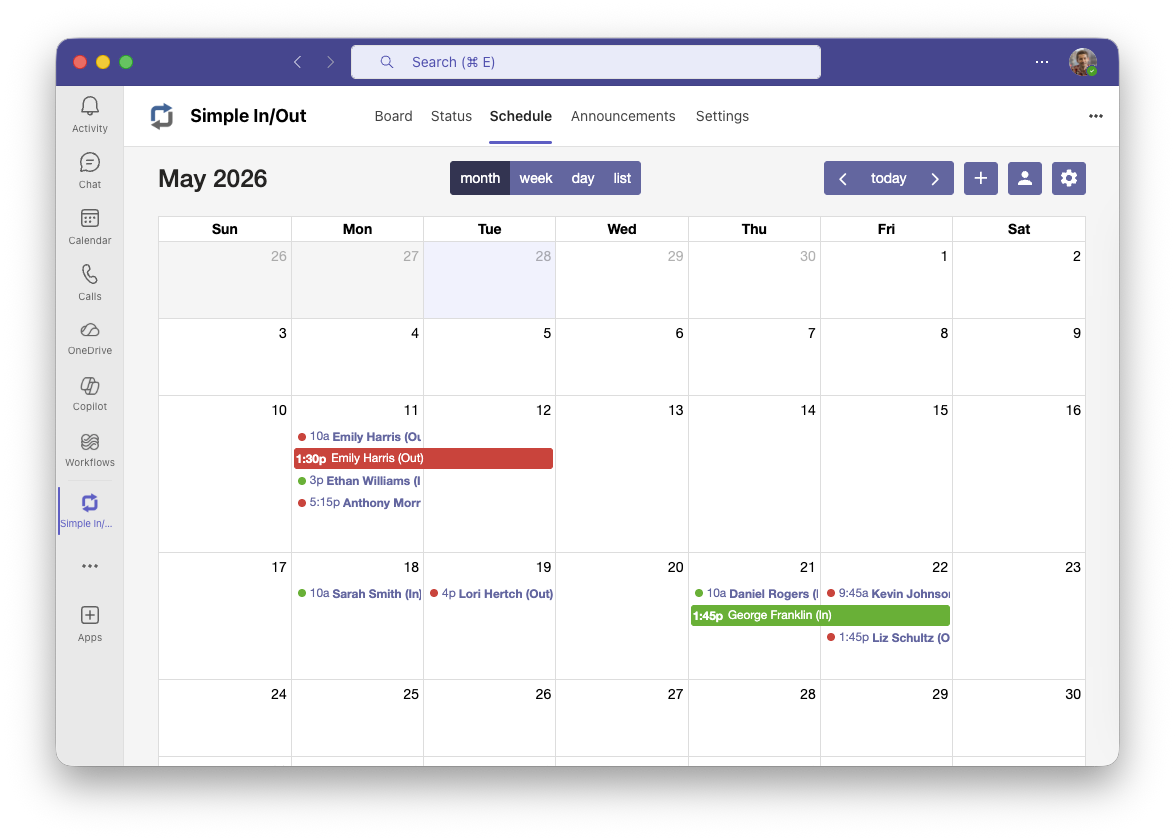
Today, we’re excited to announce the shipping of full Scheduled Status management inside our Microsoft integrations. For years, we’ve been asked to let users in Teams see their Scheduled Statuses in a more intuitive way and to allow for scheduling right within the integration. The last part in particular feels like a long-overdue addition, but we believe we’ve landed in a great place.
Our new Schedule Status interface is our best way yet for scheduling statuses in Simple In/Out. We’ve combined the convenience of the Scheduled Statuses report with the ability to schedule statuses for yourself and others (if you have permission). No jumping from list to list in different screens, no doubling back to the calendar to see how things have changed.
The new interface makes planning and reviewing upcoming status updates dramatically easier. You can view Scheduled Statuses in Month, Week, and Day views, plus a brand-new List view for quickly scanning everything at once.
Need the big picture for your own schedule? You can see your entire Scheduled Statuses list with the press of a button. Need to make a change? Adding new Scheduled Statuses is now fast and straightforward from the same experience. We’ve added your Quick Picks when scheduling to reduce typing and typos.
This new integration experience is available today for Teams, Outlook, and Microsoft 365.
As a footnote, we’re also premiering this similar interface in Public Beta on simpleinout.com. Soon, this will be available on our website as well.