
Scheduled Statuses Comes to the Web Interface
June 9, 2026 by Brandon Medenwald
Today, we are excited to announce that the same new Scheduled Statuses interface we recently launched for Microsoft Teams, Outlook, and Microsoft 365 is now available on the Simple In/Out website.
This release replaces the legacy Scheduled Statuses report with a more powerful experience built directly into the core website. Scheduled Statuses now lives outside of Reports, where it belongs, making it faster and more intuitive to plan, review, and update upcoming statuses.
With the new interface, you can:
- View Scheduled Statuses in Month, Week, Day, and List views.
- Quickly scan your upcoming schedule without switching between screens.
- Add and delete Scheduled Statuses from the same place.
- Use Quick Picks while scheduling to reduce typing and mistakes.
- Manage your own schedule and, with permission, schedule for others.
The old report gave useful visibility, but this new interface is a major step forward for day-to-day scheduling. Instead of viewing a report to understand what is coming up, you can now manage Scheduled Statuses in a purpose-built workflow designed for action.
This update is live now on simpleinout.com, and we are thrilled to bring a unified Scheduled Statuses experience across our website and Microsoft integrations.
As always, thank you for your feedback. Improvements like this one come directly from listening to our users.
Scheduled Statuses Upgrade for Microsoft Teams, Outlook, and 365
May 6, 2026 by Brandon Medenwald
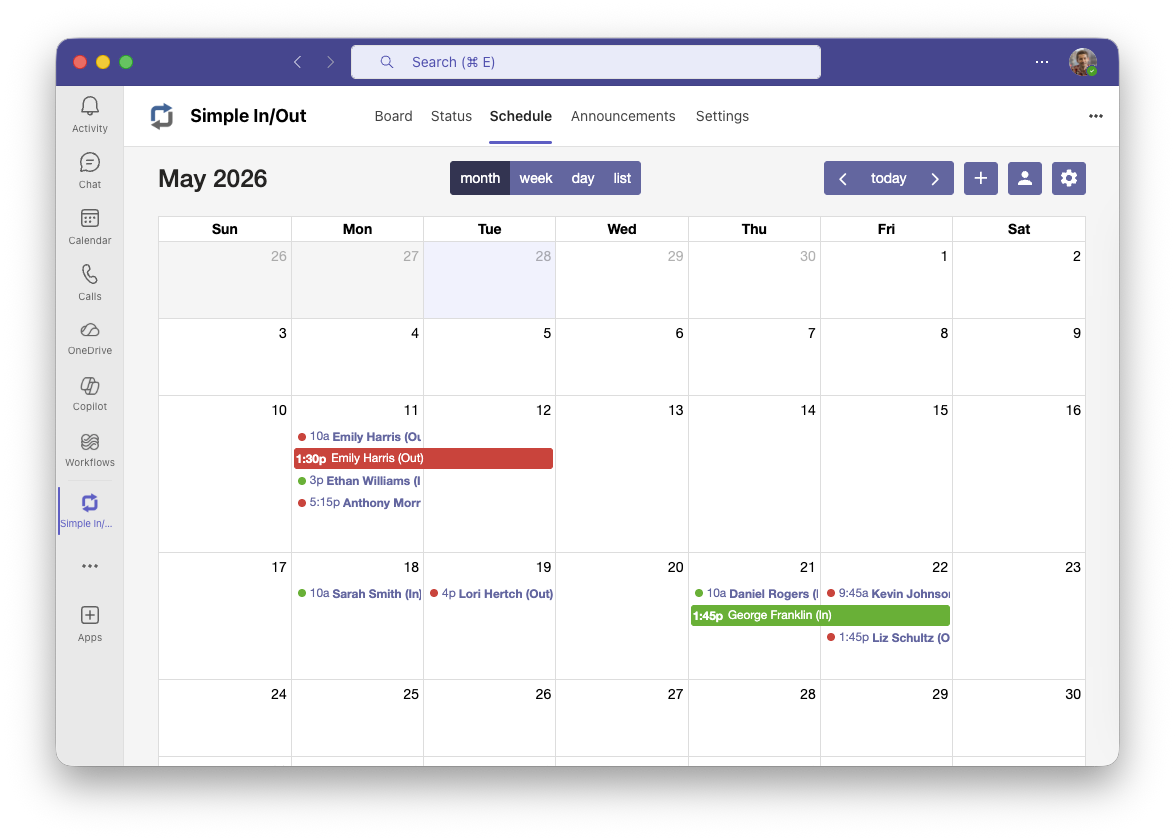
Today, we’re excited to announce the shipping of full Scheduled Status management inside our Microsoft integrations. For years, we’ve been asked to let users in Teams see their Scheduled Statuses in a more intuitive way and to allow for scheduling right within the integration. The last part in particular feels like a long-overdue addition, but we believe we’ve landed in a great place.
Our new Schedule Status interface is our best way yet for scheduling statuses in Simple In/Out. We’ve combined the convenience of the Scheduled Statuses report with the ability to schedule statuses for yourself and others (if you have permission). No jumping from list to list in different screens, no doubling back to the calendar to see how things have changed.
The new interface makes planning and reviewing upcoming status updates dramatically easier. You can view Scheduled Statuses in Month, Week, and Day views, plus a brand-new List view for quickly scanning everything at once.
Need the big picture for your own schedule? You can see your entire Scheduled Statuses list with the press of a button. Need to make a change? Adding new Scheduled Statuses is now fast and straightforward from the same experience. We’ve added your Quick Picks when scheduling to reduce typing and typos.
This new integration experience is available today for Teams, Outlook, and Microsoft 365.
As a footnote, we’re also premiering this similar interface in Public Beta on simpleinout.com. Soon, this will be available on our website as well.
Scheduled Maintenance for Simple In/Out (April 18)
April 13, 2026 by Brandon Medenwald
Simple In/Out will be offline for database maintenance on Saturday, April 18th, for approximately 2 hours. We anticipate beginning at 11:00 pm Central (US) time. During this period, the website will be inaccessible. All apps and integrations in the Simple In/Out ecosystem will report connection errors.
Most of our Microsoft Teams presence integrations will disconnect during this maintenance. Microsoft requires us to renew all Microsoft Teams presence integrations every 45 minutes (which is insane). If your Microsoft Teams presence integration disconnects, you’ll receive an email from Simple In/Out to reconnect after maintenance concludes. We have been begging Microsoft to loosen this absurd requirement to no avail. We have no options until Microsoft sets their presence subscription times to match their other Graph services.
These database maintenance tasks are necessary for important security updates.
If you have any questions, don’t hesitate to let us know.
More Accurate Networks with WiFi Access Points
March 3, 2026 by Brandon Medenwald
Today, we’re excited to announce a new feature for Simple In/Out that makes automatic status updates even smarter for organizations with multiple locations and large Wi-Fi networks.
For years, our Networks feature has helped users update their status automatically when connecting to specific WiFi networks. But for customers with several locations sharing the same WiFi SSID, this could sometimes lead to less accurate status comments and confusion on the in/out board. For example, a hospital system with several clinics around the city may use the same WiFi SSID for ease of use, yet still needs to know which clinic their resources are located in.
With our latest update, administrators can now create Networks that apply only to specific WiFi access points. This means you can target the exact hardware at each location, even if all sites use the same SSID. By making Networks more specific, Simple In/Out can create better status comments, resulting in a more accurate in/out board for everyone.
This feature is perfect for organizations with multiple offices, warehouses, or campuses that share WiFi names but need location-specific status updates. Setting up your Networks with access point details is optional but easy, and you’ll immediately see the benefits in your board’s accuracy and reporting.
As always, we’re listening to your feedback and working to make Simple In/Out the best tool for your organization. If you have questions or suggestions, don’t hesitate to reach out!
Thanks for using Simple In/Out.
Rounding in Simple In/Out Reports
February 26, 2026 by Brandon Medenwald
Rounding has finally arrived in Simple In/Out reports. Believe us, we’ve heard the requests over the years. We’re happy to make life easier for our customers using Simple In/Out for payroll purposes.
Starting today, you can apply rounding to your Time Card, Daily/Weekly Timeline, Print/PDF, and Export reports. When generating any of these reports, you’ll find a new rounding setting under Advanced Options that lets you round time to the nearest quarter hour or nearest hour. Once selected, Simple In/Out will automatically adjust reported times accordingly, giving you clean, round numbers that align with how many of you already process payroll. Combined with our recently-added hours format (which generates numbers like 7.4 hours), it has never been easier to get the numbers your payroll software needs.
The underlying status data is never altered—rounding only applies to how time is displayed in the report.
We hope this long-overdue addition makes Simple In/Out an even better fit for organizations relying on our reports for payroll. And thanks, as always, for using Simple In/Out.
Past Status Retention Customization in Simple In/Out
February 25, 2026 by Brandon Medenwald
Today, we’ve added a new setting to Simple In/Out that lets administrators choose how long Simple In/Out retains past statuses across your organization for your reporting needs.
Historically, we’ve kept past statuses for as long as you’ve been a customer and the user existed on your in/out board. Most consider the ability to run reports for as long as you’ve been a customer to be a powerful feature. Still, others worry about the privacy implications of that much data being accessible to their users. These folks have requested that we keep past status records for shorter periods. Striking that balance required us to be flexible, which is where this new setting comes in.
Organizations can now have Simple In/Out purge these past status records on a rolling basis, keeping records for only a year, a month, or even as little as a week. Importantly, we default to our historical behavior of keeping your records for as long as you are a customer.
You can access this new setting on Simple In/Out’s website today by logging in, clicking Settings in the upper-right, followed by Data Processing on the left.
Simple In/Out Desktop Presence: Now with More Power
January 26, 2026 by Brandon Medenwald
We’re excited to announce the next big release of Simple In/Out Desktop, featuring a completely redesigned Desktop Presence experience that makes automatic status updates smarter than ever.
Automatic Status Updating is a central feature of Simple In/Out, and one we pioneered all the way back in 2011 with Geofences. We’ve been listening to our customers and found that Desktop Presence didn’t always accurately update statuses for laptop users who frequently change locations. For these users, they’d either need to forgo Desktop Presence or change settings frequently. This is far from automatic, so we set out to do even better.
Smart Network Detection
Simple In/Out Desktop 3.0 can intelligently understand your network conditions to automatically update your status based on where you’re actually working—all without requiring you to change any settings. When you’re connected to your office network, Desktop Presence can automatically mark you as “In the Office.” When you’re working from home or another location, it knows you’re not in the office and can update your status more appropriately, such as “Working from home.”
No more manual toggles, accidental “In” statuses when working remotely, or confusion about your location. Desktop Presence runs in the background, adapting intelligently to your environment.
Behind the scenes, this feature works by administrators adding restrictions to a Desktop Presence setting based on the physical location’s network settings. Users can enable as many restricted Desktop Presences as they like while still having only one unrestricted Desktop Presence activated. Simple In/Out Desktop will use the appropriate settings at the appropriate time, based on the user’s computer’s network conditions.
Flexible Idle Time Settings
We know that every workplace is different. Some teams want frequent status updates to ensure accuracy, while others prefer fewer updates to avoid every interruption resulting in a status update. We now give administrators the power to customize idle time thresholds based on their company’s unique needs.
Administrators can adjust how long a computer must be idle before Desktop Presence updates a user’s status as away. Want more granular tracking? Set the idle time to 5 minutes. Prefer to reduce status changes throughout the day? Increase the idle time threshold to as much as 1 hour.
Upgrade Today
Simple In/Out Desktop 3.0, featuring the new Desktop Presence upgrade, is now available for download right on our website. If you’re using Simple In/Out Desktop, your update rolls out automatically. Not using it yet? Get started now and enjoy hands-free status management.
As always, we appreciate your feedback and suggestions. Features like these come directly from listening to our users, so reach out to us any time.
New Admin Control: Global Microsoft Teams Presence Switch
January 9, 2026 by Brandon Medenwald
Today we’re announcing a new option that gives administrators more flexibility in managing how their members use Simple In/Out: the Global Microsoft Teams Presence Switch.
Based on feedback from a few of our customers, we’ve added a new switch in Company Settings that allows administrators to globally disable the Microsoft Teams Presence feature across their entire organization.
What Does This New Switch Do?
When disabled, this new control:
- Removes existing Microsoft Teams Presence connections for all users in your organization
- Prevents new Microsoft Teams Presence connections from being established
- Maintains full Microsoft Teams integration for the user interface within Microsoft Teams
- Preserves all other functionality - users can still manually update their status and use all other Simple In/Out features
Why Would You Want This?
Many of our customers love the convenience of automatic status updates through Microsoft Teams Presence, but some organizations have found that they prefer more intentional, detailed status communication from their team members.
Here’s the scenario: When Teams Presence is active, a user’s Simple In/Out status automatically syncs with their Microsoft Teams availability (showing as “Available”, “Away”, “Busy”, etc.). While convenient, these generic status messages don’t always provide the specific context that managers and team members need.
With the Global Teams Presence Switch disabled, administrators can encourage their teams to leave more descriptive status comments like “Client meeting until 3 PM” or “Working from home”.
Microsoft Teams Integration Stays Intact
It’s important to note that disabling Microsoft Teams Presence does not affect your Microsoft Teams integration for the user interface. Your users can still see Simple In/out within Microsoft Teams, see the board, perform status updates, view announcements, etc. The only thing that changes is that status updates won’t happen automatically based on Microsoft Teams availability - users will need to manually update their status when they want to change it.
As always, we’re committed to giving administrators the tools they need to customize Simple In/Out for their organization’s unique workflow. This new feature is available immediately for all Simple In/Out customers.
Have feedback or suggestions for other administrative controls you’d like to see? We’d love to hear from you - just reach out to us.
Secure your Simple In/Out Account with Multi-Factor Authentication
December 16, 2025 by Brandon Medenwald
Multi-Factor Authentication (MFA - also known as two-factor authentication) is now available in Simple In/Out.
MFA adds a second step when signing in, increasing security by requiring your password and a time-based code. This helps protect your organization’s data from compromised passwords.
In rolling out MFA, we chose to support authenticator apps (like Google Authenticator, Microsoft Authenticator, 1Password, and others) that generate time‑based one‑time passcodes (TOTP). We opted not to use SMS because text messages can be intercepted or redirected and are widely considered less secure. Using an authenticator app provides stronger protection without relying on your phone number or the cellular network.
Getting started is quick:
-
Enable Multi‑Factor Authentication in your Simple In/Out account settings (Settings → Password & Security).
-
Scan the QR code with your preferred authenticator app (or copy/paste the text code).
-
Enter a generated time‑based one‑time passcode to confirm your MFA is configured correctly.
-
Save your recovery codes in a safe place, just in case you lose the device with the authentication app.
The next time you sign in to any of our applications, integrations, or our website, you’ll enter your password and the code from your authenticator app.
For administrators, we’ve added information about your users’ MFA configurations to the user editing page and to our Contacts report.
Security is always a priority for us, and MFA is a big step forward. If you have questions or need help getting set up, just let us know. We’re always here to help.
Simple In/Out Phone Searches by Name and Comment
December 3, 2025 by Brandon Medenwald
Simple In/Out is an excellent tool for emergency evacuations/mustering. After all, having your phone right in your pocket eliminates the need to grab a tablet, look for paper sign-in sheets, or search for printers. With one look inside the Simple In/Out app, you’ll know who is IN and must be present at your muster point.
If you have multiple locations and users that can be IN any of them, things can be trickier. While it’s easy to see all your IN users at the top of the board, knowing which to account for was always a matter of scanning the board for relevant matches. In an evacuation, every second counts.
Today, we’re shipping a significant improvement to Simple In/Out phone searching capability, allowing users to search across both user names and current status comments simultaneously. The new search lets you search for “office”, “warehouse”, or “annex” and see only users whose current status comment includes that phrase. During an evacuation, this can save you tons of time when accounting for your users.
While this seems like a simple change, it’s powerful. And, it’s one of several changes we’re planning for the future to make evacuation/mustering even better in Simple In/Out.